Source SDK (Team Fortress 2) development notes
Websites
- ValveSoftware/source-sdk-2013 - git repo
- ValveSoftware/Source-1-Games - issue tracker
Development
Patches are merged by EricS-Valve from time to time, usually late in the day or on a weekend.
The SDK game code and live TF2 are not identical. There is code in the SDK that is not present in TF2, and vice versa. For example, NotificationQueue_Add is disabled in the SDK but not in live TF2. Not to mention, Valve uses Perforce P4 for version control instead of Git.
Building with Visual Studio 2026
Valve Project Creator (VPC) only targets up to Visual Studio 2022. Visual Studio 2026 can be used if you install the 2022 toolchain:
"C:\Program Files (x86)\Microsoft Visual Studio\Installer\setup.exe" modify --installPath "C:\Program Files\Microsoft Visual Studio\18\Community" ^
    --add Microsoft.VisualStudio.Component.VC.14.44.17.14.x86.x64 ^
    --add Microsoft.VisualStudio.Component.VC.14.44.17.14.MFC     ^
    --add Microsoft.VisualStudio.Component.VC.14.44.17.14.ATL
You will need to install Python as well:
winget install Python.Python.3.14
After that, follow the build instructions in README.md.
Running and debugging
Debug builds of the SDK are broken. Use Release builds instead.
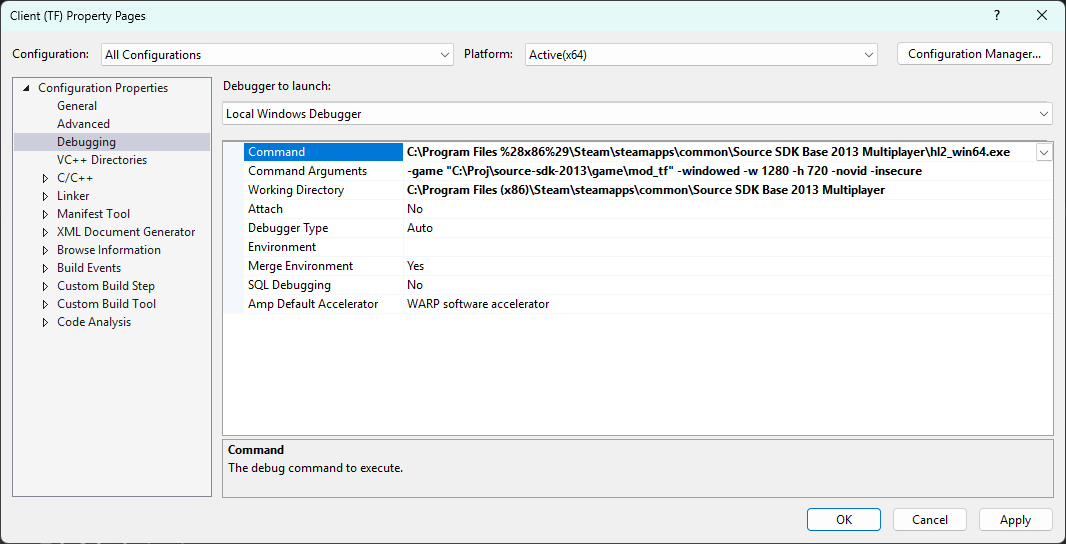
To run the game from Visual Studio, install the Source SDK Base 2013 Multiplayer and use the following project options:
Code style
- Use tabs for indentation.
- Use hungarian notation for any variable that is serialized.
- Curly braces get a new line. (Allman style)
- Curly braces can be omitted if the condition body is only one line.
- Pointer asterisks go on the right, next to the variable name.
- Put spaces around function arguments.
- Put spaces around template arguments. (Usually. The code base is like 60-40 in favor of this style.)
All this being said, much of the code base is not consistent. Just pay attention to the surrounding code and match the style.